


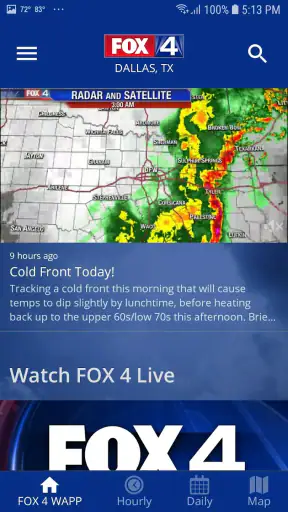
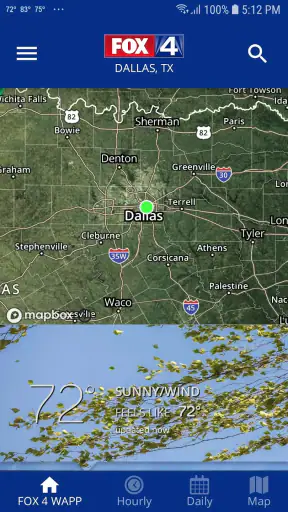
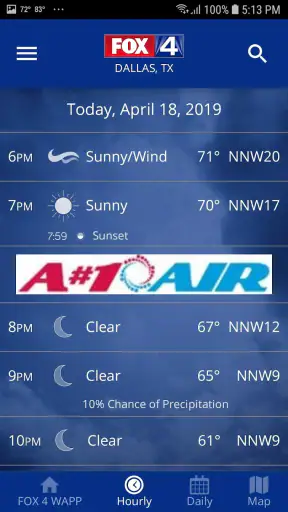
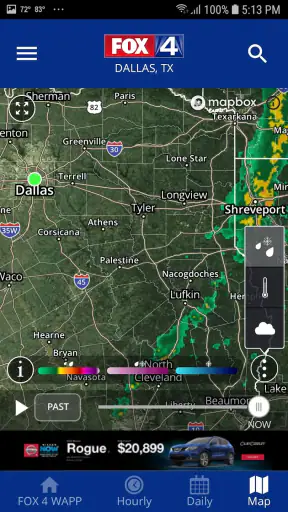
Weather apps are easy to judge when the sky is clear: open one, glance at the temperature, and move on. The real test comes when I am leaving for work under a bright morning sky, a storm line is moving toward Dallas, and the information I need depends on a connection that may be slow or unreliable. That is where FOX 4: DFW WAPP - Weather feels most relevant. It is a free weather app from Fox Television Stations, Inc., built around real-time weather information and video forecasts for the Dallas–Fort Worth area.
After spending time with it, I see it as a focused local companion rather than an all-purpose weather service. Its strongest reason to exist is the connection to FOX 4’s regional coverage. The app is most useful when I want local context, not merely a number beside a sun or cloud icon. It can help me decide whether to delay a drive, carry rain gear, or check what is happening across the metroplex before heading out.
There is also a practical limitation: this kind of experience depends heavily on receiving current information. If the network is weak, the app cannot feel as immediate, and that matters most during the exact moments when weather information is valuable. I would recommend it to Dallas–Fort Worth residents who appreciate local broadcast-style guidance, while people who mainly want a highly detailed global forecast may prefer a broader weather platform.
How FOX 4 Weather fits into a connected daily routine
Real-time information is useful only when it arrives at the right moment
The central appeal is not simply that the app belongs to the weather category. Many apps can show a forecast. What makes this one different is the local FOX 4 angle and its emphasis on current weather and video forecasts. When I open it with a reliable connection, the experience makes sense for quick decisions: checking conditions before a school run, looking at the forecast before an outdoor appointment, or watching a forecast segment when a written summary feels too vague.
That connection-first design changes how I use it. I do not treat it as a weather diary or a static reference book. I open it when the present situation matters. If rain is developing around the area, a current update can be more useful than a forecast I read several hours earlier. The information has a short shelf life, so the app works best as a live window into local conditions rather than something I consult once and forget.
A realistic example is a weekday afternoon in Fort Worth. I may already be on the road when dark clouds begin building. Instead of relying only on what I saw that morning, I can stop safely, check the latest information, and decide whether the outdoor part of my evening still makes sense. The important detail is not just the forecast itself; it is the timing of the update and whether my phone can retrieve it promptly.
Video forecasts add context, but they are not always the fastest option
I like the idea of video forecasts for situations where a simple temperature reading is not enough. A video can put changing conditions into a local narrative, which is helpful when weather is developing quickly or when several parts of the Dallas–Fort Worth region are experiencing different conditions. It also gives the app a more human, broadcast-oriented character than a screen filled only with symbols and hourly rows.
Still, video is not automatically the most convenient format. If I am standing outside a store, walking between appointments, or trying to conserve mobile data, a brief glance at text and icons may be more practical. Video typically asks for more attention and a stronger connection than a compact forecast view. I would use it when I want explanation and local perspective, not when I need a discreet answer in a few seconds.
This is one of the app’s important trade-offs. The same local presentation that makes it more engaging can make it less efficient for someone who wants nothing beyond a quick number. Users should decide whether they value broadcast-style context enough to accept a slightly more involved check-in.
Location matters more in a spread-out metro area
Dallas–Fort Worth is large enough that “the weather” can mean different things depending on where I am. A condition near one part of the metroplex may not describe what I will encounter after crossing town. That makes local awareness more important than a single generic city label. I find the app more useful when I think of it as a regional tool and pay attention to whether the information matches the place I am actually visiting.
This also affects travel planning. If I am driving from Dallas toward Fort Worth, I should not assume that a clear view outside my starting point guarantees the same conditions at my destination. A connected local weather app is valuable here because it encourages a fresh check close to departure and another look when conditions are changing. It is not a substitute for judgment, but it can reduce the risk of relying on an old observation.
Using it away from home
The app makes the most sense for people who spend time in the FOX 4 viewing area, but mobile use is where its value becomes easiest to understand. I can check it at a transit stop, in a parking lot before an event, or before leaving an office. These are moments when I may not have access to a larger screen and do not want to search through several sources.
My advice is to make the check before the decision, not after it. If I am planning a walk, outdoor meal, or drive, I would open the app while I still have time to change plans. Waiting until I am already outside in worsening conditions makes any weather app less helpful, particularly if the connection becomes congested or the signal drops.
For road use, I would keep the safety basics in mind: check before driving, and do not handle the phone while moving. The app can support a decision, but it should not become a distraction. Its mobile strength is convenience, not permission to monitor weather continuously from behind the wheel.
What happens when the connection is poor
Connectivity is the experience’s biggest practical variable. Current weather and video forecasts need fresh information, so a weak signal can turn a quick check into a wait. In a normal home or office connection, that may be barely noticeable. In a crowded venue, a rural edge outside the metro area, or a moving vehicle passing through coverage gaps, the difference is more obvious.
I would not judge a delayed update as if it were a permanent failure. The first recovery step is simple: move to a place with a stronger signal, reopen the app, and give the current information a moment to load. If I am checking video, switching to a lighter, quicker part of the experience may be sensible when time matters. The app’s value depends on fresh content, so repeatedly staring at an old screen is not a reliable recovery strategy.
That leads to a useful habit: treat the app as a connected source and keep a second safety plan for serious weather. If conditions are hazardous, I would not depend on one phone screen or one app alone. I would also pay attention to official alerts and immediate surroundings. FOX 4: DFW WAPP - Weather can help me understand local conditions, but no app removes the need for caution when visibility, roads, or storms become dangerous.
When a restart helps and when it does not
There is a difference between a temporary loading problem and a forecast disagreement. Restarting the app may help if the screen has stalled, but it will not make two weather sources agree during a rapidly changing situation. I try to avoid refreshing repeatedly without thinking about what I actually need. If the question is “Can I leave now?”, I need the newest local view available, not an endless series of identical reloads.
Video can also be more sensitive to poor connectivity than a compact forecast. If the video is slow, I would not assume the entire app is unusable. I would first look for the quickest available current information, then return to the video when I have a better connection. That workflow is more realistic than insisting on one format in every situation.
Data-conscious habits make the app easier to live with
Because the app includes video forecasts, I would be deliberate about when I use mobile data. At home or on a trusted Wi-Fi connection, video is a comfortable way to get context. Away from Wi-Fi, I would reserve it for moments when the additional explanation is genuinely useful. For a quick temperature or condition check, a shorter visit is the sensible choice.
I also avoid leaving a weather app open while doing unrelated tasks. A weather check should be intentional: open it, read or watch what I need, then close it. That is good for battery and data habits without requiring any special setting or assumption about how the app handles background activity. It also keeps the experience focused instead of turning it into a constant stream of updates that I may not actually use.
A particularly useful routine is to check once before leaving home and again before a major change in plans. For example, I might look before taking children to a park, then check again before heading back if clouds have built up. This gives current information a purpose while avoiding unnecessary repeated loading. It is a small habit, but it makes a connected weather app feel more dependable in everyday life.
Who will appreciate the local focus
I think the app is a strong fit for Dallas–Fort Worth residents who already value FOX 4’s style of local weather coverage. It is also suitable for visitors who need a regional check before commuting, attending an outdoor event, or crossing the metroplex. The Everyone content rating makes it approachable for a household, including people who want a straightforward weather source rather than a technical forecasting tool.
The app has been available since February 24, 2012, and its continued presence is reflected in a user base of over a million installs. Its average rating is 3.8 from around 8,700 ratings, with roughly 2,600 written reviews. I read that overall reception as reasonably positive but not a reason to expect perfection. A rating in that range suggests that the app works for many everyday needs while still leaving room for differences in expectations, device behavior, and connection quality.
The current release is version 6.2.520, and it requires operating system version 9 or newer. That makes checking device compatibility worthwhile before installing, especially on an older phone or tablet. Since the app is free, the decision is relatively low-risk for someone in its intended region. The more important question is whether the FOX 4 local approach matches the way that person wants to consume weather information.
Who should choose another weather tool
I would look elsewhere if I wanted a highly technical dashboard, extensive worldwide travel planning, or a weather experience designed primarily around deep historical charts. This app’s identity is local and immediate. Someone who moves between many states or countries may prefer a service built around broad location coverage and consistent tools across regions.
I would also hesitate to recommend it to a person who wants a completely minimal interface with no interest in video or local broadcast context. A basic forecast app may be faster for that user. The choice is not about which category is universally better; it is about whether local explanation improves the decision being made.
Likewise, people who regularly travel beyond dependable mobile coverage should plan carefully. I would check important forecasts before entering a weak-signal area and avoid assuming that a live connection will always be available. The app is at its best when it can retrieve current information, so it should not be the only preparation for a long trip or severe-weather situation.
My practical workflow for getting more from it
My preferred workflow starts with the question I need answered. If I am deciding whether to leave, I check the current local conditions first. If I am deciding whether an outdoor plan is sensible, I spend more time with the video forecast and look for the broader context. If I am already moving through the area, I make the check during a safe pause rather than trying to monitor the screen continuously.
I also compare the forecast with what I can see around me. A weather app provides useful information, but the real sky, road visibility, wind, and standing water are immediate evidence. When those disagree with an earlier update, I give priority to safety and seek the newest available information. This is especially important in a large region where conditions can shift during a cross-town journey.
Finally, I use the app as one part of a routine rather than as an alarm that replaces planning. A morning check, a departure check, and a sensible second look before an outdoor commitment are enough for many ordinary days. That approach keeps the app useful without making connectivity, notifications, or constant refreshing the center of my day.
My final view on FOX 4: DFW WAPP - Weather
FOX 4: DFW WAPP - Weather is most convincing when a Dallas–Fort Worth user wants current local guidance with the option of video context. I like that it feels connected to a specific region instead of trying to be everything for everyone. The free price and Everyone rating make it easy to try, while the established install base shows that it has reached a substantial audience.
Its main weakness is also clear: the experience is tied to connectivity. Slow loading can matter when weather is changing, and video is not always the best choice for a quick, data-conscious check. Those are not reasons to dismiss it, but they do shape how I would use it. I would rely on a good connection, check before important plans, and keep another source or safety habit in mind during serious conditions.
For a local resident who wants more than a generic symbol and appreciates FOX 4’s regional presentation, I would recommend giving it a try. For a traveler seeking a universal technical weather toolkit, I would choose a broader alternative. In my experience, the app earns its place on a phone not through a long list of extras, but through a simple promise: when I can connect, it gives me a convenient local way to understand what the weather may mean for the next decision I need to make.


